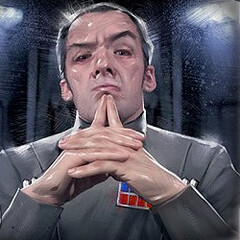
December 30, 201114 yr Ohai, and a late merry Christmas to you all! (That goes for you too, Chim! ) I was inspired over the last couple days with all the work going on here (good on ya', Lavo!), so I whipped up a new set of portraits for each of the factions. And I didn't stop there: I also redid the loading screens. Yes, they now feature concept art from both the OT and the Prequels (from Ralph McQuarrie and Ryan Church, respectively).Yeah, it's kinda elementary, but with the time required to go through all of the formatting (URGH THE ENDLESS FRAMES!), I deem it to be more a labor of love than anything to sneeze at. The intent of this quick project was to deepen the immersion factor when playing, as well as give it a bit more of a "Sins" flair (IE: drawn, rendered portraits rather than realistic pics, etc). I earnestly hope you enjoy them, even if they may not make it into SoGE 2.0e. http://www.speedyshare.com/file/qU77X/New-Portraits-and-Loading-Screens.rar (Drag n' drop the items into your Textures folder, and you'll be up and running. Mind the modcheck number, though...) PS - A big personal welcome to Warb_Null! I've been tracking your projects since you started your modeling thread on Filefront years ago, and I'm very pleased you're working with Lavo. I'm still digging that Derriphan-class battlecruiser I bugged you about, BTW. Perhaps now that you're with the team, a KotOR-era mod may now be possible...in the very distant future, naturally. Anyway, keep up the great work. Oh yeah, you too, Lavo. Edited June 13, 201214 yr by Ludo Kressh
December 30, 201114 yr I'll look at these later, thanks a bunch for 'em! Sins of a Galactic Empire staff.
December 30, 201114 yr Author Great, and you're welcome! Here are the new victory/defeat screens as well: http://speedy.sh/3JbVy/New-VictoryDefeat-Screens.rar Same operation - paste them into your SoGE 2.0e Textures folder (Override if necessary).
December 31, 201114 yr Author Sorry for the double post. I updated the portraits - swapped out the Pellaeon pic with that of a more fitting Imperial admiral. Pellaeon at the height of the Empire was still below admiral rank, let alone grand admiral, so I figured it more fitting. Also, a revised Palpatine picture, which should wrap up the whole matter. Here's the link: http://www.speedyshare.com/file/BTgXu/Portraits-1.0b.rar
January 2, 201214 yr Oh damn, you did Vong pictures as well! I'll be incorporating these three into the mod proper. Thanks again! Sins of a Galactic Empire staff.
January 2, 201214 yr Author Great! I'm glad you liked them! For those interested, here's a transparent HUD for the in-game interface, based off of a similar mod for the Requiem mod. I find it easier on the eyes compared to the stock interface, and it allows me to take in more of the eye-candy this mod brings. Just plop it in the SoGE Textures folder and enjoy! http://www.speedyshare.com/file/Hk7vd/Transparent-HUD.rar
January 2, 201214 yr Unfortunately that HUD will only work in Diplomacy, what it was made for. Though I've fixed up the Entrenchment HUD to give the same effect, will add it in next update. Sins of a Galactic Empire staff.
January 9, 201214 yr Ludo, Great work on the portraits and HUD, really gives the mod a polished look. Thanks
January 10, 201214 yr Author Thanks, wbino! There's definitely more come over the next couple of weeks, so stay tuned!
January 10, 201214 yr Ludo, After the initial splash screen the generic main menu is a let down. Any chance to make this Star WarSzZ?
January 12, 201214 yr Author It's not so much a question of possibility, but rather ability...as in my ability to create something new. I've seen some examples of new menu graphics, but they've obviously been done by people with dedicated skills in Photoshop (I use Paint.NET...which is a great, versatile tool, but it is not quite as powerful as PS), unlike myself, the "amateur's amateur" who just recently grasped the concept of the gradient tool (to create gradual shadows and transparencies). xD Over time, I undoubtedly intend to fiddle with the menu graphics (buttons, too!) and see what I can come up with (I imagine a cross between the HUD of SG:I and the Knights of the Old Republic (the 2003 game) datapad menu screens...hopefully, maybe...unsure), but I make no promises until I put something out. I do advise making use of the SG:I HUD if you desire a change (at least during play), but only so unofficially and individually, as I have. A stopgap, yes, but effective.
June 13, 201214 yr Author /gravedig Lavo: I'm still working on the missing Capital Slots research menu icon, but in the meantime here are some revised SoGE faction characters (seen during the loading screens) for each of the factions, plus some to come in the distant future. http://www.speedyshare.com/FB4CX/SoGE-Faction-Characters-2.0.zip
June 13, 201214 yr Got them; slotted them in, thanks Ludo! They've made it in time to be included in the final Ent version. Sins of a Galactic Empire staff.
June 13, 201214 yr Author As requested, here's the first iteration of the Rebellion HUD. http://www.speedyshare.com/v7zBB/SoGE-Rebellion-HUD-1.0.zip
June 13, 201214 yr Author /shameless double post And here're some updated textures for Rebellion - let me know how they work! http://www.speedyshare.com/Y8UnG/SoGE-Rebellion-Textures-1.0.zip Also, test out this slightly bluish take on the Galaxy.dds, and let me know if it's preferable to the current one. http://www.speedyshare.com/hENu6/New-Blue-Galaxy-1.0.zip
June 14, 201214 yr Looking good. Needed some minor fixes of course, but they look nice. The notorious Fleet tab continues to provide issues however; now the tech icons themselves look off-center. I also figured out where the backdrop of the "missing" big supply/crew icons is located, mainly as I had to make it not look ugly, but that didn't bring back those big icons. Sins of a Galactic Empire staff.
June 14, 201214 yr Author Hmm. Sorry about the minor issues. You know me: too exuberant to post my product before adequately testing them. :v As to the Supply icons: yeah, I located them as well, and despite much searching, the location of the large Capital Supply icon is as of yet unknown. I scoured the .window files and checking the coordinates right up until my computer starting acting up and had to clean install Windows 7, impeding work (although not losing it, thank God). After a few hours of searching, I had nothing, but the background image you mentioned. I'll give the bugger another look-see tomorrow and see if we can remedy the matter - it's gotta be in the Ingame Menu files! It really is the strangest thing.
January 7, 201412 yr Author Howdy guys; long time no post! I've recently been playing quite a bit of SoGE lately, and have been extremely impressed with the depth the game has in terms of gameplay experience. I had a massive tug-of-war with the AI over a couple of planets it simply did not want to give up even after 6 hours of capital ship death matches. It was the most fun I'd had in a long while against the AI! So, as a way of saying "Thanks for the wonderful work!", I've whipped up a UI mod which I think is LONG overdue. I am so freakin' sick of the Sins default design, especially when trying to get into a "Star Wars state of mind/play". In its stead we have a datapad theme reminiscent of the KotOR games' menus in color and styling. I also went about tweaking one or two things which I thought were out of place, namely one unit (the Sep Supply Ship), various string entries, and the loading screen characters. I'm currently working on a few other items as well, so expect a small update in the next day or so. Anyway, beyond exemplary job Lavo, and all else who've labored so hard and long over this great mod. Do let me know if you encounter issues; working 12 hours on these things makes you a little bit perfectionist to say the least. Screenshots: http://i37.photobucket.com/albums/e86/Mishach/SoGE/2014-01-07_00001_zpseca2dc0e.jpghttp://i37.photobucket.com/albums/e86/Mishach/SoGE/2014-01-07_00010_zpsc47d6972.jpghttp://i37.photobucket.com/albums/e86/Mishach/SoGE/2014-01-07_00009_zpsc210ef29.jpghttp://i37.photobucket.com/albums/e86/Mishach/SoGE/2014-01-07_00011_zpsb4a9dee4.jpghttp://i37.photobucket.com/albums/e86/Mishach/SoGE/2014-01-07_00008_zpsb21ee8dd.jpghttp://i37.photobucket.com/albums/e86/Mishach/SoGE/2014-01-07_00002_zpse7064508.jpghttp://i37.photobucket.com/albums/e86/Mishach/SoGE/2014-01-07_00004_zps62b2cf3f.jpghttp://i37.photobucket.com/albums/e86/Mishach/SoGE/2014-01-07_00005_zpsf2e202ce.jpghttp://i37.photobucket.com/albums/e86/Mishach/SoGE/2014-01-07_00006_zps543d399f.jpg Download link: http://speedy.sh/pMUWX/SoGE-Datapad-UI-and-Texture-Tweaks.rar *Also, an updated set of HUD neutronium refinery buttons: http://speedy.sh/QGSCZ/SoGE-Updated-HUD-Icons.rar**Small update to the main pack: http://www.speedyshare.com/e9Uza/UI-Tweaks-Update-1.1.rar Edited January 8, 201412 yr by Ludo Kressh
January 8, 201412 yr SWR Staff - Executive W00t - I can't see your image, but I'm guessing it looks awesome Evaders99http://swrebellion.com/images/banners/rebellionbanner02or6.gif Webmasterhttp://swrebellion.com/images/banners/swcicuserbar.png Administrator Fighting is terrible, but not as terrible as losing the will to fight.- SW:Rebellion Network - Evaders Squadron Coding -The cake is a lie.
January 8, 201412 yr Author Dang. Stupid Photobucket. Anywho, direct links are up! Thanks for the kudos; I hope they live up to them.
January 8, 201412 yr SWR Staff - Executive I can't say I like the missing top and bottom borders. The corner bezels imply they should be there Evaders99http://swrebellion.com/images/banners/rebellionbanner02or6.gif Webmasterhttp://swrebellion.com/images/banners/swcicuserbar.png Administrator Fighting is terrible, but not as terrible as losing the will to fight.- SW:Rebellion Network - Evaders Squadron Coding -The cake is a lie.
January 8, 201412 yr Author Well, it's supposed to be a holoprojector of sorts, not unlike the tactical readout screens in the Yavin Base War Room, with the bezels/projectors on either side instead of the top and bottom: http://static2.wikia.nocookie.net/__cb20130318210240/starwars/images/5/58/Strategy_Center.png The intention is for them to project from side-to-side, rather than up-down. Perhaps "datapad" was a poor term to utilize. Rather, it should be deemed a "projector screen". Sorry you dislike it. I'll think about what to do with it in the future. :/ *Added an update for the main UI pack. Small fixes and some more tweaking of loading screens, etc.
January 8, 201412 yr SWR Staff - Executive It's a small detail, I didn't mean it as a big critique. I think overall it looks great Evaders99http://swrebellion.com/images/banners/rebellionbanner02or6.gif Webmasterhttp://swrebellion.com/images/banners/swcicuserbar.png Administrator Fighting is terrible, but not as terrible as losing the will to fight.- SW:Rebellion Network - Evaders Squadron Coding -The cake is a lie.
January 8, 201412 yr Author No, no problem. It's an interesting look; I doubted it myself for a bit. A red holoscreen (like so: link) was also in the works, but it was too busy I thought. I dunno. Maybe I'll try it out anyway... Still, thanks for the input; any suggestions you could supply are more than welcome, Evaders! *Here's a red version of the UI: http://www.speedyshare.com/ThdhR/SoGE-Red-Screen-UI.rar Tell me what you think!





Create an account or sign in to comment